Sierpień 13, 2011
Geolokalizacja Tutoriale
Niniejszy wpis jest rozwinięciem artykułu omawiającego początki pracy z geolokalizacją w Androidzie (link). Dowiedzieliśmy się tam w jaki sposób dostać się do usługi lokalizacyjnej i jak za jej pomocą pobierać dane z modułów dostarczających informacje o lokalizacji.
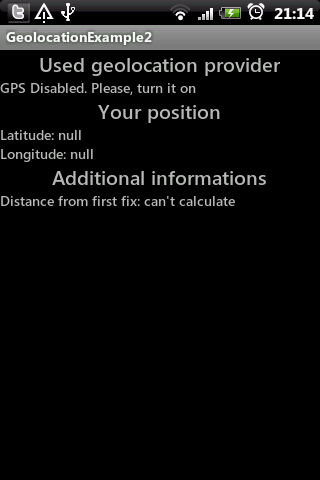
W dzisiejszym wpisie chciałbym skupić się na odczytywaniu oraz aktualizowaniu ostatniej pozycji. Przy okazji pokażę w jaki sposób możemy odczytać informacje o czasie ostatniej aktualizacji, aktualnej prędkości czy przebytym dystansie. Wszystko oczywiście za pomocą modułu GPS naszego urządzenia.
Oto plik z layoutem głównej Aktywności, za pomocą której wyświetlimy wszystkie wymagane dane:
Należy pamiętać o dodaniu odpowiedniego pozwolenia w pliku AndroidManifest.xml:
Nie będziemy korzystać z modułu sieci komórkowej, w związku z czym wystarczy pozwolenie na określanie dokładnej pozycji.
Oto kod źródłowy naszej Aktywności. Przy okazji inicjalizacji pól interfejsu pobieramy również usługę lokalizacyjną:
Skorzystamy również z metod onStart() oraz onStop() z cyklu życia Aktywności.
W związku z oszczędnością baterii, GPS nie aktualizuje informacji o swojej pozycji automatycznie (w przeciwieństwie do modułu sieci komórkowej). Dlatego też sami musimy zadbać o zmuszenie go do odświeżenia danych z naszym położeniem.
Na szczęście usługa LocationManager pozwala na ręczne skonfigurowanie takiej aktualizacji oraz dostarczenie listenera reagującego na zmiany pozycji.
Zaczniemy od stworzenia tego drugiego:
LocationListener jest interfejsem dostarczającym 4 metody:
My skorzystaliśmy tylko z ostatniej metody, która przy każdej zmianie pozycji wyświetli zarówno informacje o naszym położeniu jak i informacje dodatkowe (na temat prędkości, przebytego dystansu itp.). Ich implementacją zajmiemy się za chwilę.
Aby nasz listener zadziałał musimy jeszcze zadbać o jego dostarczenie do usługi lokalizacyjnej. Przechodzimy zatem do naszych metod onStart() oraz onStop() i dodajemy następujące linijki kodu:
Metoda requestLocationUpdates() odpowiedzialna jest za konfigurację odświeżania informacji o lokalizacji. Jej argumenty to kolejno:
Podczas konfiguracji należy pamiętać o tym, by argumenty były optymalne i nie powodowały nadmiernego zużywania energii w urządzeniu.
W związku z właściwym zarządzaniem energii wykorzystaliśmy tu metody onStart() oraz onStop(), bowiem informacje o pozycji potrzebne są nam tylko w momencie gdy Aktywność jest aktualnie wyświetlana. Dlatego też w momencie gdy znika ona z ekranu (metoda onStop()) zatrzymujemy aktualizację pozycji dzięki metodzie removeUpdates().
Na koniec dodamy jeszcze metody służące do odczytywania informacji o położeniu oraz o naszym ruchu:
Jak widać, wykorzystujemy to informacje dostarczane przez obiekt klasy Location. Posiada on bowiem wiele ciekawych informacji związanych z naszym ruchem. Polecam zapoznać się z jego kompletną dokumentacją (link).

MainActivity.java
Jak pobrać do zmiennej savedLocation pierwszą lokalizację w której w której aplikacja działa normalnie. Bo tutaj pobiera ostatnią znaną lokalizację, i jak chce aby mi wyświetlało dystans który przeszedłem, to zaczyna od iluśtam kilometrów zawsze.
Możesz np. zacząć pobierać informacje dopiero wtedy kiedy zostanie osiągnięta duża dokładność ( location.getAccuracy() ). Możesz również sprawdzać ostatni fix (czy miał miejsce krócej niż kilka minut temu – location.getTime() ).
Zaloguj się lub skorzystaj z profilu:
Możesz również zostawić komentarz bez rejestracji, korzystając z poniższego formularza:
Musisz być zalogowany aby móc pisać komentarze.
Geolokalizacja – śledzenie pozycji, dane szczegółowe o ruchu
Powiązane linki
Przygotowania
Automatyczna aktualizacja pozycji
Zrzuty ekranu
Kompletny kod źródłowy
Komentarze (2)
Prześlij komentarz
- onStatusChanged(String, int, Bundle) – wywoływana w momencie zmiany stanu dostawcy danych o lokalizacji, który jest powiązany z naszym listenerem (np. gdy z jakiegoś powodu dostawca stracił możliwość pobierania nowych danych)
- onProviderEnabled(String), onProviderDisabled(String) – wywoływane w momencie włączenia/wyłączenia dostawcy.
- onLocationChanged(Location) – wywoływana w momencie zmiany danych naszego położenia.
- dostawca danych, jakiego chcemy śledzić,
- minimalny czas pomiędzy poszczególnymi aktualizacjami (milisekundy)
- minimalny przebyty dystans pomiędzy aktualizacjami (metry)
- obiekt listenera
<?xml version="1.0" encoding="utf-8"?>
<LinearLayout
	xmlns:android="http://schemas.android.com/apk/res/android"
	android:orientation="vertical"
	android:layout_width="fill_parent"
	android:layout_height="fill_parent">
	<TextView
		android:layout_width="wrap_content"
		android:layout_height="wrap_content"
		android:textSize="20sp"
		android:layout_gravity="center"
		android:text="Used geolocation provider" />
	<TextView
		android:layout_width="wrap_content"
		android:layout_height="wrap_content"
		android:id="@+id/tvProvider"
		android:text="---" />
	<TextView
		android:layout_width="wrap_content"
		android:layout_height="wrap_content"
		android:textSize="20sp"
		android:layout_gravity="center"
		android:text="Your position" />
	<TextView
		android:layout_width="wrap_content"
		android:layout_height="wrap_content"
		android:id="@+id/tvLatitude" android:text="Latitude: waiting for first fix"/>
	<TextView
		android:layout_width="wrap_content"
		android:layout_height="wrap_content"
		android:id="@+id/tvLongitude" android:text="Longitute: waiting for first fix"/>
	<TextView
		android:layout_width="wrap_content"
		android:layout_height="wrap_content"
		android:text="Additional informations"
		android:textSize="20sp"
		android:layout_gravity="center" />
	<TextView
		android:layout_width="wrap_content"
		android:layout_height="wrap_content"
		android:text="---"
		android:id="@+id/tvInformations" />
</LinearLayout>
<uses-permission android:name="android.permission.ACCESS_FINE_LOCATION" />
public class MainActivity extends Activity {
	private TextView tvProvider;
	private TextView tvLongitude;
	private TextView tvLatitude;
	private TextView tvInformations;

	private LocationManager locationManager;

	@Override
	public void onCreate(Bundle savedInstanceState) {
		super.onCreate(savedInstanceState);
		setContentView(R.layout.main);
		tvProvider = (TextView) findViewById(R.id.tvProvider);
		tvLatitude = (TextView) findViewById(R.id.tvLatitude);
		tvLongitude = (TextView) findViewById(R.id.tvLongitude);
		tvInformations = (TextView) findViewById(R.id.tvInformations);
		locationManager = (LocationManager) getSystemService(Context.LOCATION_SERVICE);
		if (locationManager.isProviderEnabled(LocationManager.GPS_PROVIDER))
			tvProvider.setText("GPS");
		else
			tvProvider.setText("GPS Disabled. Please, turn it on");
	}

	@Override
	protected void onStart() {
		super.onStart();
	}

	@Override
	protected void onStop() {
		super.onStop();
	}
}
public class MainActivity extends Activity {
private TextView tvProvider;
private TextView tvLongitude;
private TextView tvLatitude;
private TextView tvInformations;
private LocationManager locationManager;
private Location savedLocation = null;
private LocationListener locationListener = new LocationListener() {
public void onStatusChanged(String provider, int status, Bundle extras) {}
public void onProviderEnabled(String provider) {}
public void onProviderDisabled(String provider) {}
public void onLocationChanged(Location location) {
showLocation(location);
showAdditionalInfo(location);
if (savedLocation == null)
savedLocation = locationManager.getLastKnownLocation(LocationManager.GPS_PROVIDER);
}
};
@Override
public void onCreate(Bundle savedInstanceState) {
super.onCreate(savedInstanceState);
setContentView(R.layout.main);
tvProvider = (TextView) findViewById(R.id.tvProvider);
tvLatitude = (TextView) findViewById(R.id.tvLatitude);
tvLongitude = (TextView) findViewById(R.id.tvLongitude);
tvInformations = (TextView) findViewById(R.id.tvInformations);
locationManager = (LocationManager) getSystemService(Context.LOCATION_SERVICE);
if (locationManager.isProviderEnabled(LocationManager.GPS_PROVIDER))
tvProvider.setText("GPS");
else
tvProvider.setText("GPS Disabled. Please, turn it on");
}
@Override
protected void onStart() {
super.onStart();
}
@Override
protected void onStop() {
super.onStop();
}
} @Override
protected void onStart() {
super.onStart();
locationManager.requestLocationUpdates(
LocationManager.GPS_PROVIDER,
3000, 2, locationListener);
}
@Override
protected void onStop() {
locationManager.removeUpdates(locationListener);
super.onStop();
} private void showLocation(Location location) {
String latitude = "Latitude: ";
String longitude = "Longitude: ";
if (location != null) {
latitude += location.getLatitude();
longitude += location.getLongitude();
tvLatitude.setText(latitude);
tvLongitude.setText(longitude);
}
}
private void showAdditionalInfo(Location location) {
String infos = "Distance from first fix: ";
if (savedLocation == null || location == null) {
infos += "can't calculate";
} else {
infos += savedLocation.distanceTo(location) + "m\n";
infos += "Accuracy: ";
infos += location.getAccuracy() + "m \n";
infos += "Last fix: ";
infos += new Date(location.getTime()).toGMTString() + "\n";
infos += "Speed: ";
infos += location.getSpeed() + "m/s";
}
tvInformations.setText(infos);
}package pl.froger.hello.locationtracking;
import java.util.Date;
import android.app.Activity;
import android.content.Context;
import android.location.Location;
import android.location.LocationListener;
import android.location.LocationManager;
import android.os.Bundle;
import android.widget.TextView;
public class MainActivity extends Activity {
private TextView tvProvider;
private TextView tvLongitude;
private TextView tvLatitude;
private TextView tvInformations;
private LocationManager locationManager;
private Location savedLocation = null;
private LocationListener locationListener = new LocationListener() {
public void onStatusChanged(String provider, int status, Bundle extras) {}
public void onProviderEnabled(String provider) {}
public void onProviderDisabled(String provider) {}
public void onLocationChanged(Location location) {
showLocation(location);
showAdditionalInfo(location);
if (savedLocation == null)
savedLocation = locationManager.getLastKnownLocation(LocationManager.GPS_PROVIDER);
}
};
@Override
public void onCreate(Bundle savedInstanceState) {
super.onCreate(savedInstanceState);
setContentView(R.layout.main);
tvProvider = (TextView) findViewById(R.id.tvProvider);
tvLatitude = (TextView) findViewById(R.id.tvLatitude);
tvLongitude = (TextView) findViewById(R.id.tvLongitude);
tvInformations = (TextView) findViewById(R.id.tvInformations);
locationManager = (LocationManager) getSystemService(Context.LOCATION_SERVICE);
if (locationManager.isProviderEnabled(LocationManager.GPS_PROVIDER))
tvProvider.setText("GPS");
else
tvProvider.setText("GPS Disabled. Please, turn it on");
}
	@Override
	protected void onStart() {
		super.onStart();
		locationManager.requestLocationUpdates(
				LocationManager.GPS_PROVIDER,
				3000, 2, locationListener);
	}

	@Override
	protected void onStop() {
		locationManager.removeUpdates(locationListener);
		super.onStop();
	}
	private void showLocation(Location location) {
		String latitude = "Latitude: ";
		String longitude = "Longitude: ";
		if (location != null) {
			latitude += location.getLatitude();
			longitude += location.getLongitude();
			tvLatitude.setText(latitude);
			tvLongitude.setText(longitude);
		}
	}

	private void showAdditionalInfo(Location location) {
		String infos = "Distance from first fix: ";
		if (savedLocation == null || location == null) {
			infos += "can't calculate";
		} else {
			infos += savedLocation.distanceTo(location) + "m\n";
			infos += "Accuracy: ";
			infos += location.getAccuracy() + "m \n";
			infos += "Last fix: ";
			infos += new Date(location.getTime()).toGMTString() + "\n";
			infos += "Speed: ";
			infos += location.getSpeed() + "m/s";
		}
		tvInformations.setText(infos);
	}
}
26 sierpnia 2011 o 10:20
26 sierpnia 2011 o 10:25