Lipiec 28, 2011
Okna dialogowe Tutoriale UI
Okno dialogowe reprezentowane w Androidzie przez klasę Dialog jest elementem interfejsu, który możne w znaczący sposób rozszerzyć interakcję z użytkownikiem aplikacji. Daje nam ono możliwości wyświetlania krótkich komunikatów, pytań do użytkownika, próśb o podjęcie decyzji i wielu innych tego typu. W dzisiejszym artykule zapoznamy się z tego typu zastosowaniami, które zaprezentujemy na przykładzie niewielkiej aplikacji.
Nim jednak do tego przejdziemy, warto jeszcze wspomnieć, że oprócz klasy Dialog reprezentującej typowe okno dialogowe, w Androidzie istnieje również klasa Toast (artykuł na jej temat) służącą do wyświetlania czegoś w rodzaju okienka popup. Różnica między tymi dwoma elementami jest taka, że Dialog wyświetla „statyczne” informacje (które do zniknięcia z ekranu wymagają jakiegoś zachowania użytkownika), natomiast Toast wyświetla krótką informację, która po kilku sekundach znika sama.
Zbudujemy teraz prostą aplikację, która zaprezentuje nam kilka różnych okien dialogowych.
Layout będzie składał się z 4 przycisków, z których każdy uruchomi nam inny rodzaj okienka dialogowego. Oto kod kod źródłowy plików, które w tym momencie nas mniej interesują.
Layout Aktywności – main.xml
Layout jednego z okien dialogowych – dialog.xml
strings.xml
Budowę głównej Aktywności zaczniemy od inicjalizacji elementów layoutu. Dodatkowo klasę MainActivity wzbogacimy o stałe liczbowe, na podstawie których będziemy wiedzieć które okno dialogowe należy uruchomić.
Stałe te będą przekazywane do metody klasy Activity – showDialog(int id). Jej argumentem jest identyfikator okna dialogowego, które ma być uruchomione.
Teraz zajmiemy się inicjalizacją naszej metody initButtonsClick():
W zależności od klikniętego przycisku wywołana zostanie metoda ukazująca odpowiednie okno dialogowe.
Pozostało nam jeszcze nadpisanie metody, która rzeczone okno zwróci. Jest nią onCreateDialog(int id). Oto nasza implementacja tej metody:
W tym momencie pozostało nam już tylko stworzenie podświetlonych powyżej metod, które zwrócą gotowe okno dialogowe do metody onCreateDialog(…).
Do tworzenia okien dialogowych wykorzystywać będziemy wzorzec Budowniczy znajdujący się w klasie AlertDialog.Builder. Za pomocą obiektu tej klasy będziemy ustawiać wszelkie atrybuty naszego okna dialogowego, które następnie stworzymy za pomocą metody create() wywołanej na naszym Budowniczym.
Najprostszym przykładem będzie zwykłe okno dialogowe składające się z tytułu i krótkiej informacji.
Prosta sprawa, prawda?
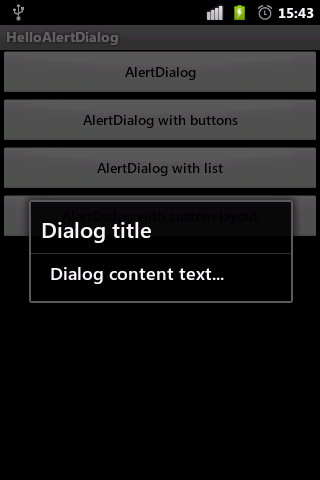
Kolejnym przykładem będzie okno dialogowe wyświetlające przyciski decyzyjne. Do wyboru mamy trzy:
Oczywiście to od nas zależy które z przycisków chcemy wyświetlić. W praktyce, wyświetlenie dwóch przycisków (tak i i nie) wygląda w ten sposób:
Zaznaczona metoda setCancelable(boolean cancelable) oznacza możliwość anulowania naszego okna dialogowego. Kiedy ustawiona jest na true, możliwe jest wyłączenie okna za pomocą przycisku Back naszego urządzenia. W wypadku false możemy je wyłączyć tylko poprzez klikniecie w którykolwiek przycisk okna dialogowego.
Jeszcze kod metody showToast(String message) do kompletu:
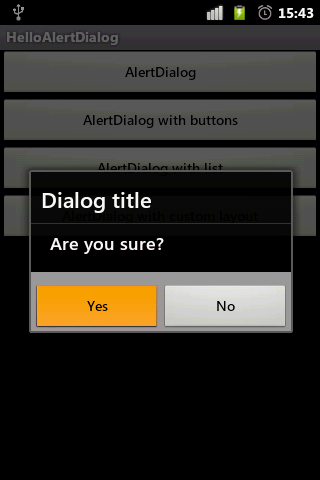
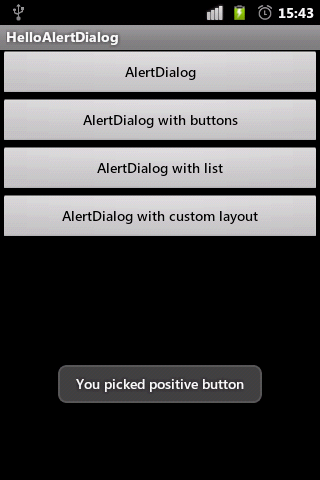
Kolejnym przykładem będzie okno dialogowe wyświetlające listę elementów. W naszym przypadku będzie ona jednokrotnego wyboru, aczkolwiek warto pamiętać, że istnieje również wersja wielokrotnego wyboru tworzona za pomocą metody setMultiChoiceItems(…).
Oto kod naszego okna z listą:
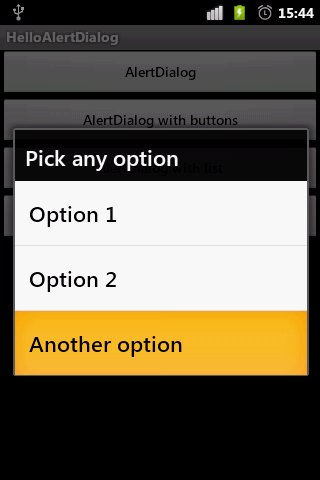
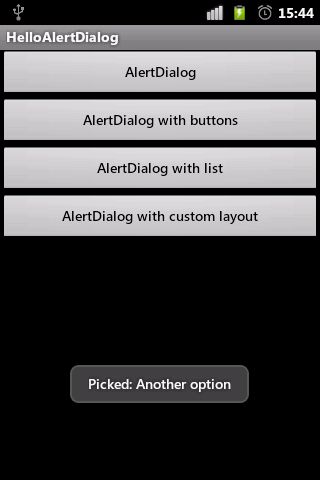
Jeżeli powyższe przykłady nam nie wystarczą, mamy możliwość zbudowania własnego wyglądu okna dialogowego. Wszystko sprowadza się do stworzenia widoku za pomocą obiektu klasy LayoutInflater i ustawienia go w naszym oknie dialogowym:
Gdybyśmy w takim wypadku chcieli odwołać się do któregoś z elementów naszego okna dialogowego, wystarczy na jego obiekcie wywołać metodę findViewById(…), która zwróci nam odpowiedni obiekt.
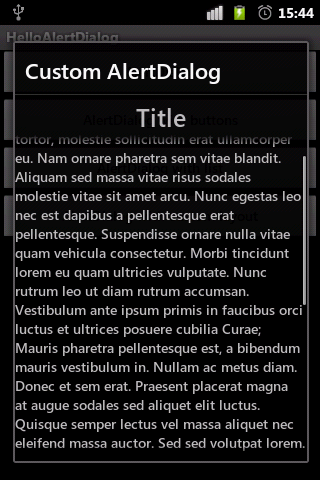
I to wszystko w tym temacie. Kompletny kod źródłowy można znaleźć poniżej.
Cały projekt dostępny jest na naszym Githubie – HelloAlertDialog.
MainActivity.java
[…] AlertDialog, wstęp do okien dialogowych […]
Zaloguj się lub skorzystaj z profilu:
Możesz również zostawić komentarz bez rejestracji, korzystając z poniższego formularza:
Musisz być zalogowany aby móc pisać komentarze.
AlertDialog, wstęp do okien dialogowych
Powiązane linki
Przykład wykorzystania AlertDialog
Przygotowania
Kod źródłowy Aktywności
Kompletny kod źródłowy
Komentarze (1)
Prześlij komentarz
Podstawowe okno dialogowe
Decyzyjne okno dialogowe
Okno dialogowe z listą wyboru
Okno dialogowe z niestandardowym layoutem
- Podstawowe elementy UI – Button, EditText, TextView, Toast, LinearLayout
- Wzorzec Budowniczy
- Creating dialogs tutorial
- Pozytywny, ustawiany za pomocą metody budowniczego setPositiveButton(CharSequence text, OnClickListener listener).
- Negatywny, ustawiany za pomocą setNegativButton(…).
- Neutralny, ustawiany za pomocą setNeutralButton(…).
<?xml version="1.0" encoding="utf-8"?>
<LinearLayout
	xmlns:android="http://schemas.android.com/apk/res/android"
	android:orientation="vertical"
	android:layout_width="fill_parent"
	android:layout_height="fill_parent">
	<Button
		android:id="@+id/btnNewAlertDialog"
		android:layout_width="fill_parent"
		android:layout_height="wrap_content"
		android:text="@string/newAlertDialog" />
	<Button
		android:id="@+id/btnNewAlertDialogButton"
		android:layout_width="fill_parent"
		android:layout_height="wrap_content"
		android:text="@string/newAlertDialogButton" />
	<Button
		android:id="@+id/btnNewAlertDialogList"
		android:layout_width="fill_parent"
		android:layout_height="wrap_content"
		android:text="@string/newAlertDialogList" />
	<Button
		android:id="@+id/btnNewCustomAlertDialog"
		android:layout_width="fill_parent"
		android:layout_height="wrap_content"
		android:text="@string/newCustomAlertDialog" />
</LinearLayout>
<?xml version="1.0" encoding="utf-8"?>
<LinearLayout
	xmlns:android="http://schemas.android.com/apk/res/android"
	android:id="@+id/layout_root"
	android:orientation="vertical"
	android:layout_width="fill_parent"
	android:layout_height="fill_parent">
	<TextView
		android:gravity="center_horizontal"
		android:id="@+id/tvDialogTitle"
		android:text="@string/dialogTitle"
		android:textSize="10pt"
		android:layout_height="wrap_content"
		android:layout_width="fill_parent" />
	<ScrollView
		android:layout_width="fill_parent"
		android:layout_height="wrap_content">
		<TextView
			android:id="@+id/tvDialogText"
			android:layout_width="fill_parent"
			android:layout_height="wrap_content"
			android:text="@string/dialogText" />
	</ScrollView>
</LinearLayout>
<?xml version="1.0" encoding="utf-8"?>
<resources>
	<string name="app_name">HelloAlertDialog</string>
	<string name="newAlertDialog">AlertDialog</string>
	<string name="newAlertDialogButton">AlertDialog with buttons</string>
	<string name="newAlertDialogList">AlertDialog with list</string>
	<string name="newCustomAlertDialog">AlertDialog with custom layout</string>
	<string name="dialogTitle">Title</string>
	<string name="dialogText">Lorem ipsum dolor sit amet, consectetur adipiscing
		elit. Cras adipiscing dignissim tortor, molestie sollicitudin erat
		ullamcorper eu. Nam ornare pharetra sem vitae blandit. Aliquam sed
		massa vitae risus sodales molestie vitae sit amet arcu. Nunc egestas
		leo nec est dapibus a pellentesque erat pellentesque. Suspendisse
		ornare nulla vitae quam vehicula consectetur. Morbi tincidunt lorem eu
		quam ultricies vulputate. Nunc rutrum leo ut diam rutrum accumsan.
		Vestibulum ante ipsum primis in faucibus orci luctus et ultrices
		posuere cubilia Curae; Mauris pharetra pellentesque est, a bibendum
		mauris vestibulum in. Nullam ac metus diam. Donec et sem erat.
		Praesent placerat magna at augue sodales sed aliquet elit luctus.
		Quisque semper lectus vel massa aliquet nec eleifend massa auctor. Sed
		sed volutpat lorem.</string>
</resources>
public class MainActivity extends Activity {
	static final private int ALERT_DIALOG_PLAIN = 1;
	static final private int ALERT_DIALOG_BUTTONS = 2;
	static final private int ALERT_DIALOG_LIST = 3;
	static final private int CUSTOM_ALERT_DIALOG = 4;

	private Button btnNewAlertDialog;
	private Button btnNewAlertDialogButton;
	private Button btnNewAlertDialogList;
	private Button btnNewCustomAlertDialog;

	@Override
	public void onCreate(Bundle savedInstanceState) {
		super.onCreate(savedInstanceState);
		setContentView(R.layout.main);
		btnNewAlertDialog = (Button) findViewById(R.id.btnNewAlertDialog);
		btnNewAlertDialogButton = (Button) findViewById(R.id.btnNewAlertDialogButton);
		btnNewAlertDialogList = (Button) findViewById(R.id.btnNewAlertDialogList);
		btnNewCustomAlertDialog = (Button) findViewById(R.id.btnNewCustomAlertDialog);
		initButtonsClick();
	}
}
private void initButtonsClick() {
OnClickListener listener = new OnClickListener() {
@Override
public void onClick(View v) {
switch (v.getId()) {
case R.id.btnNewAlertDialog:
showDialog(ALERT_DIALOG_PLAIN);
break;
case R.id.btnNewAlertDialogButton:
showDialog(ALERT_DIALOG_BUTTONS);
break;
case R.id.btnNewAlertDialogList:
showDialog(ALERT_DIALOG_LIST);
break;
case R.id.btnNewCustomAlertDialog:
showDialog(CUSTOM_ALERT_DIALOG);
break;
default:
break;
}
}
};
btnNewAlertDialog.setOnClickListener(listener);
btnNewAlertDialogButton.setOnClickListener(listener);
btnNewAlertDialogList.setOnClickListener(listener);
btnNewCustomAlertDialog.setOnClickListener(listener);
} @Override
protected Dialog onCreateDialog(int id) {
switch (id) {
case ALERT_DIALOG_PLAIN:
return createPlainAlertDialog();
case ALERT_DIALOG_BUTTONS:
return createAlertDialogWithButtons();
case ALERT_DIALOG_LIST:
return createAlertDialogWithList();
case CUSTOM_ALERT_DIALOG:
return createCustomAlertDialog();
default:
return null;
}
} private Dialog createPlainAlertDialog() {
AlertDialog.Builder dialogBuilder = new AlertDialog.Builder(this);
dialogBuilder.setTitle("Dialog title");
dialogBuilder.setMessage("Dialog content text...");
return dialogBuilder.create();
} private Dialog createAlertDialogWithButtons() {
AlertDialog.Builder dialogBuilder = new AlertDialog.Builder(this);
dialogBuilder.setTitle("Dialog title");
dialogBuilder.setMessage("Are you sure?");
dialogBuilder.setCancelable(false);
dialogBuilder.setPositiveButton("Yes", new Dialog.OnClickListener() {
@Override
public void onClick(DialogInterface dialog, int whichButton) {
showToast("You picked positive button");
}
});
dialogBuilder.setNegativeButton("No", new Dialog.OnClickListener() {
@Override
public void onClick(DialogInterface dialog, int whichButton) {
showToast("You picked negative button");
}
});
return dialogBuilder.create();
} private void showToast(String message) {
Toast.makeText(getApplicationContext(),
message,
Toast.LENGTH_LONG).show();
} private Dialog createAlertDialogWithList() {
AlertDialog.Builder dialogBuilder = new AlertDialog.Builder(this);
final String[] options = {"Option 1", "Option 2", "Another option"};
dialogBuilder.setTitle("Pick any option");
dialogBuilder.setItems(options, new DialogInterface.OnClickListener() {
@Override
public void onClick(DialogInterface dialog, int position) {
showToast("Picked: " + options[position]);
}
});
return dialogBuilder.create();
} private Dialog createCustomAlertDialog() {
AlertDialog.Builder dialogBuilder = new AlertDialog.Builder(this);
View layout = getCustomDialogLayout();
dialogBuilder.setView(layout);
dialogBuilder.setTitle("Custom AlertDialog");
return dialogBuilder.create();
}
private View getCustomDialogLayout() {
LayoutInflater inflater = (LayoutInflater) getSystemService(LAYOUT_INFLATER_SERVICE);
return inflater.inflate(R.layout.dialog, (ViewGroup)findViewById(R.id.layout_root));
}package pl.froger.helloalertdialog;
import android.app.Activity;
import android.app.AlertDialog;
import android.app.Dialog;
import android.content.DialogInterface;
import android.os.Bundle;
import android.view.LayoutInflater;
import android.view.View;
import android.view.View.OnClickListener;
import android.view.ViewGroup;
import android.widget.Button;
import android.widget.Toast;
public class MainActivity extends Activity {
static final private int ALERT_DIALOG_PLAIN = 1;
static final private int ALERT_DIALOG_BUTTONS = 2;
static final private int ALERT_DIALOG_LIST = 3;
static final private int CUSTOM_ALERT_DIALOG = 4;
private Button btnNewAlertDialog;
private Button btnNewAlertDialogButton;
private Button btnNewAlertDialogList;
private Button btnNewCustomAlertDialog;
@Override
public void onCreate(Bundle savedInstanceState) {
super.onCreate(savedInstanceState);
setContentView(R.layout.main);
btnNewAlertDialog = (Button) findViewById(R.id.btnNewAlertDialog);
btnNewAlertDialogButton = (Button) findViewById(R.id.btnNewAlertDialogButton);
btnNewAlertDialogList = (Button) findViewById(R.id.btnNewAlertDialogList);
btnNewCustomAlertDialog = (Button) findViewById(R.id.btnNewCustomAlertDialog);
initButtonsClick();
}
	private void initButtonsClick() {
		OnClickListener listener = new OnClickListener() {
			@Override
			public void onClick(View v) {
				switch (v.getId()) {
				case R.id.btnNewAlertDialog:
					showDialog(ALERT_DIALOG_PLAIN);
					break;
				case R.id.btnNewAlertDialogButton:
					showDialog(ALERT_DIALOG_BUTTONS);
					break;
				case R.id.btnNewAlertDialogList:
					showDialog(ALERT_DIALOG_LIST);
					break;
				case R.id.btnNewCustomAlertDialog:
					showDialog(CUSTOM_ALERT_DIALOG);
					break;

				default:
					break;
				}
			}
		};
		btnNewAlertDialog.setOnClickListener(listener);
		btnNewAlertDialogButton.setOnClickListener(listener);
		btnNewAlertDialogList.setOnClickListener(listener);
		btnNewCustomAlertDialog.setOnClickListener(listener);
	}
	@Override
	protected Dialog onCreateDialog(int id) {
		switch (id) {
		case ALERT_DIALOG_PLAIN:
			return createPlainAlertDialog();
		case ALERT_DIALOG_BUTTONS:
			return createAlertDialogWithButtons();
		case ALERT_DIALOG_LIST:
			return createAlertDialogWithList();
		case CUSTOM_ALERT_DIALOG:
			return createCustomAlertDialog();
		default:
			return null;

		}
	}
	private Dialog createPlainAlertDialog() {
		AlertDialog.Builder dialogBuilder = new AlertDialog.Builder(this);
		dialogBuilder.setTitle("Dialog title");
		dialogBuilder.setMessage("Dialog content text...");
		return dialogBuilder.create();
	}
	private Dialog createAlertDialogWithButtons() {
		AlertDialog.Builder dialogBuilder = new AlertDialog.Builder(this);
		dialogBuilder.setTitle("Dialog title");
		dialogBuilder.setMessage("Are you sure?");
		dialogBuilder.setCancelable(false);
		dialogBuilder.setPositiveButton("Yes", new Dialog.OnClickListener() {
		    @Override
		    public void onClick(DialogInterface dialog, int whichButton) {
		    	showToast("You picked positive button");
		    }
		});
		dialogBuilder.setNegativeButton("No", new Dialog.OnClickListener() {
		    @Override
		    public void onClick(DialogInterface dialog, int whichButton) {
		    	showToast("You picked negative button");
		    }
		});
		return dialogBuilder.create();
	}
	private void showToast(String message) {
        Toast.makeText(getApplicationContext(),
                message,
                Toast.LENGTH_LONG).show();
	}
	private Dialog createAlertDialogWithList() {
		AlertDialog.Builder dialogBuilder = new AlertDialog.Builder(this);
		final String[] options = {"Option 1", "Option 2", "Another option"};
		dialogBuilder.setTitle("Pick any option");
		dialogBuilder.setItems(options, new DialogInterface.OnClickListener() {
		    @Override
		    public void onClick(DialogInterface dialog, int position) {
		        showToast("Picked: " + options[position]);
		    }
		});
		return dialogBuilder.create();
	}
	private Dialog createCustomAlertDialog() {
		AlertDialog.Builder dialogBuilder = new AlertDialog.Builder(this);
		View layout = getCustomDialogLayout();
	    dialogBuilder.setView(layout);
	    dialogBuilder.setTitle("Custom AlertDialog");
		return dialogBuilder.create();
	}

	private View getCustomDialogLayout() {
	    LayoutInflater inflater = (LayoutInflater) getSystemService(LAYOUT_INFLATER_SERVICE);
	    return inflater.inflate(R.layout.dialog, (ViewGroup)findViewById(R.id.layout_root));
	}
}
28 lipca 2011 o 20:10