Lipiec 25, 2011
Kompatybilność Tutoriale UI
System Android pozwala nam na definiowanie rozmiarów elementów UI w kilku różnych jednostkach miary. Problem w tym, że większa część z nich nie powinna być używana „na codzień”, bez wyraźnego uzasadnienia. Dlatego też dzisiejszy wpis poświęcony będzie na przedstawienie wszystkich jednostek wielkości dostarczonych przez twórców Androida.
Jak powszechnie wiadomo system Android jest bardzo elastyczny i pozwala instalować się na przeróżnych urządzeniach. Efektem tego są telefony, tablety, telewizory a nawet lodówki działające pod jego kontrolą. Jak nietrudno się domyślić każde z tych urządzeń może posiadać inny wyświetlacz (zarówno pod względem rozdzielczości jak i wielkości). A to z kolei prowadzi do problemu, z którym borykają się nieuważni programiści – na jednym urządzeniu (np. telefonie) pewien element zajmuje całą szerokość wyświetlacza, a na innym (np. 10 calowy tablet) zajmuje tylko niewielką jego część. Dlaczego tak jest? Bo nieuważny programista skorzystał z jednostki o stałej fizycznej wielkości.
Aby zaradzić tego typu problemom, twórcy systemu wprowadzili szereg różnych wielkości, którym przyjrzymy się z bliższa w tym artykule.
Oto lista jednostek miary, z jakich możemy korzystać przy projektowaniu elementów layoutu:
W skrócie, przy projektowaniu aplikacji powinniśmy korzystać z jednostek dp do ustalania wielkości elementów UI, natomiast z sp dla wielkości czcionek wszelkich napisów.
Aby zademonstrować różnice pomiędzy jednostkami, stworzymy i uruchomimy Aktywność-miarkę na kilku różnych urządzeniach.
Oto kod źródłowy layoutu Aktywności, który wykorzystamy do tego celu – main.xml:
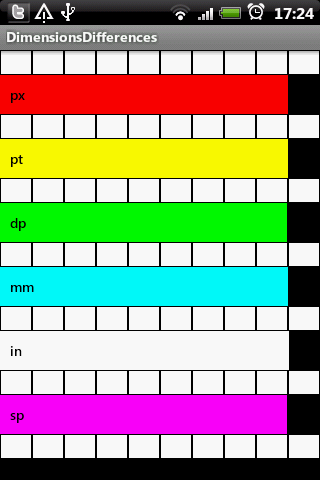
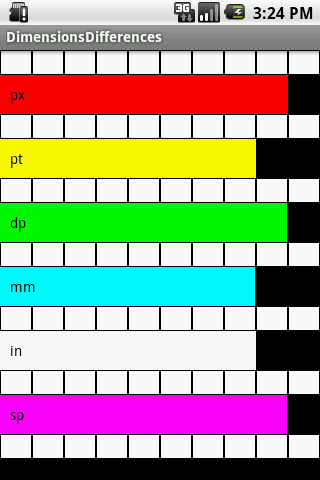
Oto jak prezentuje się powyższy kod na różnych urządzeniach:
HTC Hero:
Google Nexus One:

Typowy AVD:
Zaloguj się lub skorzystaj z profilu:
Możesz również zostawić komentarz bez rejestracji, korzystając z poniższego formularza:
Musisz być zalogowany aby móc pisać komentarze.
Jednostki miary, czyli różnice pomiędzy px, pt, dp, mm, in oraz sp
Z czego wynika problem
Lista jednostek
Przykład różnic pomiędzy jednostkami przy różnych wyświetlaczach
Komentarze (0)
Prześlij komentarz
- px – piksele, chyba najbardziej znana jednostka miary wyświetlaczy. Niestety również bardzo często odradzana. Szczególnie w przypadku urządzeń mobilnych, gdzie urządzenia o tej samej przekątnej ekranu wcale nie muszą mieć takiej samej rozdzielczości.
Przykład: Rozdzielczości WQVGA (240×400) oraz WVGA(480×800), które można znaleźć w urządzeniach o tych samych przekątnych. Jak widać element o szerokości 240px na jednym z nich zajmowałby cały wyświetlacz, a na drugim tylko połowę. - mm – milimetry jeszcze „bardziej” bezwzględna skala niż piksele. Bazuje na wielkości wyświetlacza.
- in – cale j.w.
- pt – punkty j.w. (dokładnie jest to 1/72 część cala).
- dp (można pisać również dip) – Density-independent Pixels czyli jednostka niezależna od gęstości pikseli. Najbardziej abstrakcyjna jednostka, która uniezależnia element layoutu od rozdzielczości oraz wielkości wyświetlacza. Dzięki temu też jest to najbardziej polecana jednostka do projektowania wyglądu aplikacji mobilnych. Jednostka ta bazuje na wyświetlaczu 160dpi (160punktów na cal). Dzięki temu 1dp jest odpowiednikiem 1 piksela przy gęstości 160dpi. Oczywiście stosunek piksel-dp jest zmieniany wraz ze zmianą gęstości wyświetlacza.
- sp – Scale-independent Pixels. Jednostka o działaniu podobnym do dp, z tą różnicą, że podczas skalowania pod uwagę brane są również ustawienia użytkownika. Dokładnie, jednostka ta jest zależna od wartości Settings.System.FONT_SCALE (link do dokumentacji). Dlatego też sp powinniśmy stosować do definiowania wielkości czcionek oraz wszystkich wymiarów z nimi związanych.
<?xml version="1.0" encoding="utf-8"?>
<LinearLayout
xmlns:android="http://schemas.android.com/apk/res/android"
android:orientation="vertical"
android:layout_width="fill_parent"
android:layout_height="fill_parent">
<LinearLayout
android:orientation="horizontal"
android:layout_width="fill_parent"
android:layout_height="25dp">
<View
android:layout_width="fill_parent"
android:layout_height="fill_parent"
android:background="#ffffff"
android:layout_weight="1"
android:layout_margin="1px" />
<View
android:layout_width="fill_parent"
android:layout_height="fill_parent"
android:background="#ffffff"
android:layout_weight="1"
android:layout_margin="1px" />
<View
android:layout_width="fill_parent"
android:layout_height="fill_parent"
android:background="#ffffff"
android:layout_weight="1"
android:layout_margin="1px" />
<View
android:layout_width="fill_parent"
android:layout_height="fill_parent"
android:background="#ffffff"
android:layout_weight="1"
android:layout_margin="1px" />
<View
android:layout_width="fill_parent"
android:layout_height="fill_parent"
android:background="#ffffff"
android:layout_weight="1"
android:layout_margin="1px" />
<View
android:layout_width="fill_parent"
android:layout_height="fill_parent"
android:background="#ffffff"
android:layout_weight="1"
android:layout_margin="1px" />
<View
android:layout_width="fill_parent"
android:layout_height="fill_parent"
android:background="#ffffff"
android:layout_weight="1"
android:layout_margin="1px" />
<View
android:layout_width="fill_parent"
android:layout_height="fill_parent"
android:background="#ffffff"
android:layout_weight="1"
android:layout_margin="1px" />
<View
android:layout_width="fill_parent"
android:layout_height="fill_parent"
android:background="#ffffff"
android:layout_weight="1"
android:layout_margin="1px" />
<View
android:layout_width="fill_parent"
android:layout_height="fill_parent"
android:background="#ffffff"
android:layout_weight="1"
android:layout_margin="1px" />
</LinearLayout>
<TextView
android:padding="10dp"
android:textColor="#000000"
android:layout_height="wrap_content"
android:background="#ff0000"
android:layout_width="288px"
android:text="px" />
<LinearLayout
android:orientation="horizontal"
android:layout_width="fill_parent"
android:layout_height="25dp">
<View
android:layout_width="fill_parent"
android:layout_height="fill_parent"
android:background="#ffffff"
android:layout_weight="1"
android:layout_margin="1px" />
<View
android:layout_width="fill_parent"
android:layout_height="fill_parent"
android:background="#ffffff"
android:layout_weight="1"
android:layout_margin="1px" />
<View
android:layout_width="fill_parent"
android:layout_height="fill_parent"
android:background="#ffffff"
android:layout_weight="1"
android:layout_margin="1px" />
<View
android:layout_width="fill_parent"
android:layout_height="fill_parent"
android:background="#ffffff"
android:layout_weight="1"
android:layout_margin="1px" />
<View
android:layout_width="fill_parent"
android:layout_height="fill_parent"
android:background="#ffffff"
android:layout_weight="1"
android:layout_margin="1px" />
<View
android:layout_width="fill_parent"
android:layout_height="fill_parent"
android:background="#ffffff"
android:layout_weight="1"
android:layout_margin="1px" />
<View
android:layout_width="fill_parent"
android:layout_height="fill_parent"
android:background="#ffffff"
android:layout_weight="1"
android:layout_margin="1px" />
<View
android:layout_width="fill_parent"
android:layout_height="fill_parent"
android:background="#ffffff"
android:layout_weight="1"
android:layout_margin="1px" />
<View
android:layout_width="fill_parent"
android:layout_height="fill_parent"
android:background="#ffffff"
android:layout_weight="1"
android:layout_margin="1px" />
<View
android:layout_width="fill_parent"
android:layout_height="fill_parent"
android:background="#ffffff"
android:layout_weight="1"
android:layout_margin="1px" />
</LinearLayout>
<TextView
android:padding="10dp"
android:textColor="#000000"
android:id="@+id/TextView02"
android:layout_height="wrap_content"
android:background="#ffff00"
android:layout_width="115pt"
android:text="pt" />
<LinearLayout
android:orientation="horizontal"
android:layout_width="fill_parent"
android:layout_height="25dp">
<View
android:layout_width="fill_parent"
android:layout_height="fill_parent"
android:background="#ffffff"
android:layout_weight="1"
android:layout_margin="1px" />
<View
android:layout_width="fill_parent"
android:layout_height="fill_parent"
android:background="#ffffff"
android:layout_weight="1"
android:layout_margin="1px" />
<View
android:layout_width="fill_parent"
android:layout_height="fill_parent"
android:background="#ffffff"
android:layout_weight="1"
android:layout_margin="1px" />
<View
android:layout_width="fill_parent"
android:layout_height="fill_parent"
android:background="#ffffff"
android:layout_weight="1"
android:layout_margin="1px" />
<View
android:layout_width="fill_parent"
android:layout_height="fill_parent"
android:background="#ffffff"
android:layout_weight="1"
android:layout_margin="1px" />
<View
android:layout_width="fill_parent"
android:layout_height="fill_parent"
android:background="#ffffff"
android:layout_weight="1"
android:layout_margin="1px" />
<View
android:layout_width="fill_parent"
android:layout_height="fill_parent"
android:background="#ffffff"
android:layout_weight="1"
android:layout_margin="1px" />
<View
android:layout_width="fill_parent"
android:layout_height="fill_parent"
android:background="#ffffff"
android:layout_weight="1"
android:layout_margin="1px" />
<View
android:layout_width="fill_parent"
android:layout_height="fill_parent"
android:background="#ffffff"
android:layout_weight="1"
android:layout_margin="1px" />
<View
android:layout_width="fill_parent"
android:layout_height="fill_parent"
android:background="#ffffff"
android:layout_weight="1"
android:layout_margin="1px" />
</LinearLayout>
<TextView
android:padding="10dp"
android:textColor="#000000"
android:id="@+id/TextView03"
android:layout_height="wrap_content"
android:background="#00ff00"
android:layout_width="287dp"
android:text="dp" />
<LinearLayout
android:orientation="horizontal"
android:layout_width="fill_parent"
android:layout_height="25dp">
<View
android:layout_width="fill_parent"
android:layout_height="fill_parent"
android:background="#ffffff"
android:layout_weight="1"
android:layout_margin="1px" />
<View
android:layout_width="fill_parent"
android:layout_height="fill_parent"
android:background="#ffffff"
android:layout_weight="1"
android:layout_margin="1px" />
<View
android:layout_width="fill_parent"
android:layout_height="fill_parent"
android:background="#ffffff"
android:layout_weight="1"
android:layout_margin="1px" />
<View
android:layout_width="fill_parent"
android:layout_height="fill_parent"
android:background="#ffffff"
android:layout_weight="1"
android:layout_margin="1px" />
<View
android:layout_width="fill_parent"
android:layout_height="fill_parent"
android:background="#ffffff"
android:layout_weight="1"
android:layout_margin="1px" />
<View
android:layout_width="fill_parent"
android:layout_height="fill_parent"
android:background="#ffffff"
android:layout_weight="1"
android:layout_margin="1px" />
<View
android:layout_width="fill_parent"
android:layout_height="fill_parent"
android:background="#ffffff"
android:layout_weight="1"
android:layout_margin="1px" />
<View
android:layout_width="fill_parent"
android:layout_height="fill_parent"
android:background="#ffffff"
android:layout_weight="1"
android:layout_margin="1px" />
<View
android:layout_width="fill_parent"
android:layout_height="fill_parent"
android:background="#ffffff"
android:layout_weight="1"
android:layout_margin="1px" />
<View
android:layout_width="fill_parent"
android:layout_height="fill_parent"
android:background="#ffffff"
android:layout_weight="1"
android:layout_margin="1px" />
</LinearLayout>
<TextView
android:padding="10dp"
android:id="@+id/TextView04"
android:layout_height="wrap_content"
android:background="#00ffff"
android:layout_width="40.5mm"
android:textColor="#000000"
android:text="mm" />
<LinearLayout
android:orientation="horizontal"
android:layout_width="fill_parent"
android:layout_height="25dp">
<View
android:layout_width="fill_parent"
android:layout_height="fill_parent"
android:background="#ffffff"
android:layout_weight="1"
android:layout_margin="1px" />
<View
android:layout_width="fill_parent"
android:layout_height="fill_parent"
android:background="#ffffff"
android:layout_weight="1"
android:layout_margin="1px" />
<View
android:layout_width="fill_parent"
android:layout_height="fill_parent"
android:background="#ffffff"
android:layout_weight="1"
android:layout_margin="1px" />
<View
android:layout_width="fill_parent"
android:layout_height="fill_parent"
android:background="#ffffff"
android:layout_weight="1"
android:layout_margin="1px" />
<View
android:layout_width="fill_parent"
android:layout_height="fill_parent"
android:background="#ffffff"
android:layout_weight="1"
android:layout_margin="1px" />
<View
android:layout_width="fill_parent"
android:layout_height="fill_parent"
android:background="#ffffff"
android:layout_weight="1"
android:layout_margin="1px" />
<View
android:layout_width="fill_parent"
android:layout_height="fill_parent"
android:background="#ffffff"
android:layout_weight="1"
android:layout_margin="1px" />
<View
android:layout_width="fill_parent"
android:layout_height="fill_parent"
android:background="#ffffff"
android:layout_weight="1"
android:layout_margin="1px" />
<View
android:layout_width="fill_parent"
android:layout_height="fill_parent"
android:background="#ffffff"
android:layout_weight="1"
android:layout_margin="1px" />
<View
android:layout_width="fill_parent"
android:layout_height="fill_parent"
android:background="#ffffff"
android:layout_weight="1"
android:layout_margin="1px" />
</LinearLayout>
<TextView
android:padding="10dp"
android:textColor="#000000"
android:id="@+id/TextView05"
android:layout_height="wrap_content"
android:background="#ffffff"
android:layout_width="1.6in"
android:text="in" />
<LinearLayout
android:orientation="horizontal"
android:layout_width="fill_parent"
android:layout_height="25dp">
<View
android:layout_width="fill_parent"
android:layout_height="fill_parent"
android:background="#ffffff"
android:layout_weight="1"
android:layout_margin="1px" />
<View
android:layout_width="fill_parent"
android:layout_height="fill_parent"
android:background="#ffffff"
android:layout_weight="1"
android:layout_margin="1px" />
<View
android:layout_width="fill_parent"
android:layout_height="fill_parent"
android:background="#ffffff"
android:layout_weight="1"
android:layout_margin="1px" />
<View
android:layout_width="fill_parent"
android:layout_height="fill_parent"
android:background="#ffffff"
android:layout_weight="1"
android:layout_margin="1px" />
<View
android:layout_width="fill_parent"
android:layout_height="fill_parent"
android:background="#ffffff"
android:layout_weight="1"
android:layout_margin="1px" />
<View
android:layout_width="fill_parent"
android:layout_height="fill_parent"
android:background="#ffffff"
android:layout_weight="1"
android:layout_margin="1px" />
<View
android:layout_width="fill_parent"
android:layout_height="fill_parent"
android:background="#ffffff"
android:layout_weight="1"
android:layout_margin="1px" />
<View
android:layout_width="fill_parent"
android:layout_height="fill_parent"
android:background="#ffffff"
android:layout_weight="1"
android:layout_margin="1px" />
<View
android:layout_width="fill_parent"
android:layout_height="fill_parent"
android:background="#ffffff"
android:layout_weight="1"
android:layout_margin="1px" />
<View
android:layout_width="fill_parent"
android:layout_height="fill_parent"
android:background="#ffffff"
android:layout_weight="1"
android:layout_margin="1px" />
</LinearLayout>
<TextView
android:padding="10dp"
android:textColor="#000000"
android:id="@+id/TextView06"
android:layout_height="wrap_content"
android:background="#ff00ff"
android:layout_width="287sp"
android:text="sp" />
<LinearLayout
android:orientation="horizontal"
android:layout_width="fill_parent"
android:layout_height="25dp">
<View
android:layout_width="fill_parent"
android:layout_height="fill_parent"
android:background="#ffffff"
android:layout_weight="1"
android:layout_margin="1px" />
<View
android:layout_width="fill_parent"
android:layout_height="fill_parent"
android:background="#ffffff"
android:layout_weight="1"
android:layout_margin="1px" />
<View
android:layout_width="fill_parent"
android:layout_height="fill_parent"
android:background="#ffffff"
android:layout_weight="1"
android:layout_margin="1px" />
<View
android:layout_width="fill_parent"
android:layout_height="fill_parent"
android:background="#ffffff"
android:layout_weight="1"
android:layout_margin="1px" />
<View
android:layout_width="fill_parent"
android:layout_height="fill_parent"
android:background="#ffffff"
android:layout_weight="1"
android:layout_margin="1px" />
<View
android:layout_width="fill_parent"
android:layout_height="fill_parent"
android:background="#ffffff"
android:layout_weight="1"
android:layout_margin="1px" />
<View
android:layout_width="fill_parent"
android:layout_height="fill_parent"
android:background="#ffffff"
android:layout_weight="1"
android:layout_margin="1px" />
<View
android:layout_width="fill_parent"
android:layout_height="fill_parent"
android:background="#ffffff"
android:layout_weight="1"
android:layout_margin="1px" />
<View
android:layout_width="fill_parent"
android:layout_height="fill_parent"
android:background="#ffffff"
android:layout_weight="1"
android:layout_margin="1px" />
<View
android:layout_width="fill_parent"
android:layout_height="fill_parent"
android:background="#ffffff"
android:layout_weight="1"
android:layout_margin="1px" />
</LinearLayout>
</LinearLayout>