Sierpień 5, 2011
Podstawowe komponenty Services Tutoriale
Komunikacja pomiędzy Usługą a Aktywnością najczęściej sprowadza się do przesyłania Intencji między sobą. Czasem jednak sposób ten nie jest zbyt wygodny i nie daje nam takie swobody wymiany informacji jakiej byśmy oczekiwali. W takim wypadku z pomocą przychodzi nam bindowanie tych dwóch elementów. Dzięki takiemu zabiegowi Aktywność może uzyskać dostęp do instancji klasy Usługi, a co za tym idzie do jej wszystkich składowych publicznych.
W dzisiejszym artykule zapoznamy się z prostą konstrukcją pozwalającą na takie połączenie.
Naszą aplikację oprzemy o kod źródłowy stworzony w artykule omawiającym wstęp do wykorzystania Usług. Oto kod źródłowy od którego zaczniemy pracę:
ClientActivity.java
MyService.java
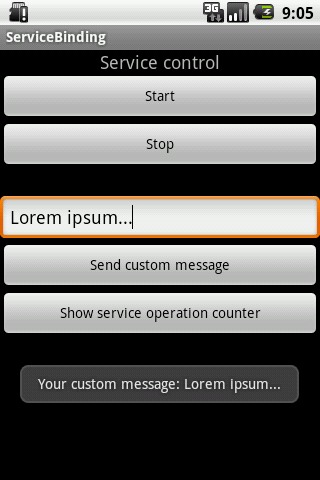
UI aplikacji rozwiniemy o pole tekstowe i dwa dodatkowe przyciski:
Działanie naszego przykładu będzie polegało na przesyłaniu komunikatu z Aktywności do Usługi.
Zaczniemy od skonfigurowania Usługi. Założenie jest proste – ma ona zliczać ilość wykonanych operacji i na życzenie Aktywności wyświetlić ten licznik. Powinna też dawać możliwość ustawienia wiadomości, która jest cyklicznie wyświetlana.
Oto modyfikacja kodu posiadająca taką funkcjonalność:
Pozostało nam tylko zaimplementowanie mechanizmu, który pozwoli na przekazanie obiektu naszej Usługi do Aktywności.
Tworzymy zatem zagnieżdżoną klasę dziedziczącą po klasie Binder, której zadaniem będzie zwrócenie obiektu Usługi. Dodamy też od razu pole przechowujące instancję naszego bindera wewnątrz Usługi:
Teraz wystarczy tylko zwrócić obiekt binder w nadpisanej metodzie onBind(…):
I od strony kodu źródłowego Usługi to wszystko. Dla pewności jeszcze poniżej jej kompletny kod źródłowy:
Przejdziemy teraz do kodu źródłowego Aktywności. Jej zadaniem będzie pobranie instancji klasy MyService i wykorzystanie jej metod publicznych, które zaimplementowaliśmy powyżej.
Zaczniemy od rozbudowania jej o niezbędną funkcjonalność:
Teraz pozostało nam tylko pobranie obiektu MyService. Sprowadza się to dwóch czynności:
Podczas wywołania tej drugiej metody – onServiceConnected(), przekazywany jest obiekt, który zwraca metoda onBind() naszej usługi. W naszym wypadku będzie to instancja klasy zagnieżdżonej MyService.MyBinder, która posiada metodę zwracającą naszą usługę.
I to wszystko. Od teraz mamy dostęp do obiektu Usługi bezpośrednio z poziomu Aktywności.
Oto kompletny kod źródłowy Aktywności:
Cały projekt dostępny jest na naszym githubie – ServiceBinding.
Zaloguj się lub skorzystaj z profilu:
Możesz również zostawić komentarz bez rejestracji, korzystając z poniższego formularza:
Musisz być zalogowany aby móc pisać komentarze.
Bindowanie Usługi z Aktywnością
Powiązane linki
Przygotowanie
Konfiguracja Usługi
Konfiguracja Aktywności
Zrzuty ekranu
Kompletny kod źródłowy
Komentarze (0)
Prześlij komentarz
- Tworzymy obiekt zarządzający połączeniem Usługa <-> Aktywność. Wystarczy zaimplementować interfejs ServiceConnection, który posiada dwie metody – onServiceDisconnected(…) oraz onServiceConnected(…):
private ServiceConnection serviceConnection = new ServiceConnection() { public void onServiceDisconnected(ComponentName name) { myService = null; } public void onServiceConnected(ComponentName name, IBinder service) { MyService.MyBinder binder = (MyService.MyBinder) service; myService = binder.getMyService(); } }; - Kiedy stworzymy obiekt połączenia wystarczy tylko wywołać metodę bindService(…) w momencie gdy chcemy pobrać instancję Usługi, oraz unbindService(…) gdy takie połączenie chcemy zakończyć:
	private void startMyService() {
		Intent serviceIntent = new Intent(this, MyService.class);
		startService(serviceIntent);
		bindService(serviceIntent, serviceConnection, Context.BIND_AUTO_CREATE);
	}

	private void stopMyService() {
		Intent serviceIntent = new Intent(this, MyService.class);
		unbindService(serviceConnection);
		stopService(serviceIntent);
	}
package pl.froger.helloservices;

import android.app.Activity;
import android.content.Intent;
import android.os.Bundle;
import android.view.View;
import android.view.View.OnClickListener;
import android.widget.Button;

public class ClientActivity extends Activity {
	private Button btnStartService;
	private Button btnStopService;

	@Override
	public void onCreate(Bundle savedInstanceState) {
		super.onCreate(savedInstanceState);
		setContentView(R.layout.main);
		btnStartService = (Button) findViewById(R.id.btnStartService);
		btnStopService = (Button) findViewById(R.id.btnStopService);
		initButtonsOnClick();
	}

	private void initButtonsOnClick() {
		OnClickListener listener = new OnClickListener() {
			public void onClick(View v) {
				switch (v.getId()) {
				case R.id.btnStartService:
					startMyService();
					break;
				case R.id.btnStopService:
					stopMyService();
					break;
				default:
					break;
				}
			}
		};
		btnStartService.setOnClickListener(listener);
		btnStopService.setOnClickListener(listener);
	}

	private void startMyService() {
		Intent serviceIntent = new Intent(this, MyService.class);
		startService(serviceIntent);
	}

	private void stopMyService() {
		Intent serviceIntent = new Intent(this, MyService.class);
		stopService(serviceIntent);
	}
}
package pl.froger.helloservices;
import java.util.Timer;
import java.util.TimerTask;
import android.app.Service;
import android.content.Intent;
import android.os.IBinder;
import android.util.Log;
import android.widget.Toast;
public class MyService extends Service {
private Toast toast;
private Timer timer;
private TimerTask timerTask;
private class MyTimerTask extends TimerTask {
@Override
public void run() {
showToast("Your service is still working");
}
}
private void showToast(String text) {
toast.setText(text);
toast.show();
}
private void writeToLogs(String message) {
Log.d("HelloServices", message);
}
@Override
public void onCreate() {
super.onCreate();
writeToLogs("Called onCreate() method.");
timer = new Timer();
toast = Toast.makeText(this, "", Toast.LENGTH_SHORT);
}
@Override
public int onStartCommand(Intent intent, int flags, int startId) {
writeToLogs("Called onStartCommand() methond");
clearTimerSchedule();
initTask();
timer.scheduleAtFixedRate(timerTask, 4 * 1000, 4 * 1000);
showToast("Your service has been started");
return super.onStartCommand(intent, flags, startId);
}
private void clearTimerSchedule() {
if(timerTask != null) {
timerTask.cancel();
timer.purge();
}
}
private void initTask() {
timerTask = new MyTimerTask();
}
@Override
public void onDestroy() {
writeToLogs("Called onDestroy() method");
clearTimerSchedule();
showToast("Your service has been stopped");
super.onDestroy();
}
@Override
public IBinder onBind(Intent arg0) {
return null;
}
}<?xml version="1.0" encoding="utf-8"?> <LinearLayout xmlns:android="http://schemas.android.com/apk/res/android" android:orientation="vertical" android:layout_width="fill_parent" android:layout_height="fill_parent"> <TextView android:id="@+id/tvServiceControl" android:layout_width="wrap_content" android:layout_height="wrap_content" android:layout_gravity="center" android:text="Service control" android:textSize="18dp" /> <Button android:id="@+id/btnStartService" android:layout_width="fill_parent" android:layout_height="wrap_content" android:text="Start" android:layout_gravity="center" /> <Button android:id="@+id/btnStopService" android:layout_width="fill_parent" android:layout_height="wrap_content" android:text="Stop" android:layout_gravity="center" /> <EditText android:layout_width="fill_parent" android:layout_height="wrap_content" android:id="@+id/etCustomMessage" android:layout_marginTop="25dp" android:hint="Custom message for service..."> <requestFocus></requestFocus> </EditText> <Button android:layout_height="wrap_content" android:layout_width="fill_parent" android:id="@+id/btnSendCustomMessage" android:text="Send custom message"></Button> <Button android:layout_height="wrap_content" android:layout_width="fill_parent" android:text="Show service operation counter" android:id="@+id/btnShowServiceOperationCounter"></Button> </LinearLayout>
public class MyService extends Service {
	private int operationCounter;
	private String customMessage;

	private Toast toast;
	private Timer timer;
	private TimerTask timerTask;
	private class MyTimerTask extends TimerTask {
		@Override
		public void run() {
			if(customMessage == null) {
				showToast("Your service is still working");
			} else {
				showToast("Your custom message: " + customMessage);
			}
			operationCounter++;
		}
	}

	public void setCustomMessage(String customMessage) {
		this.customMessage = customMessage;
	}

	public void showOperationCounter() {
		showToast("Operation counter: " + operationCounter);
	}

	private void showToast(String text) {
		toast.setText(text);
		toast.show();
	}

	private void writeToLogs(String message) {
		Log.d("HelloServices", message);
	}

	@Override
	public void onCreate() {
		super.onCreate();
		writeToLogs("Called onCreate() method.");
		timer = new Timer();
		toast = Toast.makeText(this, "", Toast.LENGTH_SHORT);
		operationCounter = 1;
	}

	@Override
	public int onStartCommand(Intent intent, int flags, int startId) {
		writeToLogs("Called onStartCommand() methond");
		clearTimerSchedule();
		initTask();
		timer.scheduleAtFixedRate(timerTask, 4 * 1000, 4 * 1000);
		showToast("Your service has been started");
		return super.onStartCommand(intent, flags, startId);
	}

	private void clearTimerSchedule() {
		if(timerTask != null) {
			timerTask.cancel();
			timer.purge();
		}
	}

	private void initTask() {
		timerTask = new MyTimerTask();
	}

	@Override
	public void onDestroy() {
		writeToLogs("Called onDestroy() method");
		clearTimerSchedule();
		showToast("Your service has been stopped");
		super.onDestroy();
	}

	@Override
	public IBinder onBind(Intent arg0) {
		return null;
	}
}
private final IBinder binder = new MyBinder();
public class MyBinder extends Binder {
MyService getMyService() {
return MyService.this;
}
} @Override
public IBinder onBind(Intent arg0) {
return binder;
}package pl.froger.servicebinding;
import java.util.Timer;
import java.util.TimerTask;
import android.app.Service;
import android.content.Intent;
import android.os.Binder;
import android.os.IBinder;
import android.util.Log;
import android.widget.Toast;
public class MyService extends Service {
private int operationCounter;
private String customMessage;
private Toast toast;
private Timer timer;
private TimerTask timerTask;
private class MyTimerTask extends TimerTask {
@Override
public void run() {
if(customMessage == null) {
showToast("Your service is still working");
} else {
showToast("Your custom message: " + customMessage);
}
operationCounter++;
}
}
	private final IBinder binder = new MyBinder();
	public class MyBinder extends Binder {
		MyService getMyService() {
			return MyService.this;
		}
	}
public void setCustomMessage(String customMessage) {
this.customMessage = customMessage;
}
public void showOperationCounter() {
showToast("Operation counter: " + operationCounter);
}
private void showToast(String text) {
toast.setText(text);
toast.show();
}
private void writeToLogs(String message) {
Log.d("HelloServices", message);
}
@Override
public void onCreate() {
super.onCreate();
writeToLogs("Called onCreate() method.");
timer = new Timer();
toast = Toast.makeText(this, "", Toast.LENGTH_SHORT);
operationCounter = 1;
}
@Override
public int onStartCommand(Intent intent, int flags, int startId) {
writeToLogs("Called onStartCommand() methond");
clearTimerSchedule();
initTask();
timer.scheduleAtFixedRate(timerTask, 4 * 1000, 4 * 1000);
showToast("Your service has been started");
return super.onStartCommand(intent, flags, startId);
}
private void clearTimerSchedule() {
if(timerTask != null) {
timerTask.cancel();
timer.purge();
}
}
private void initTask() {
timerTask = new MyTimerTask();
}
@Override
public void onDestroy() {
writeToLogs("Called onDestroy() method");
clearTimerSchedule();
showToast("Your service has been stopped");
super.onDestroy();
}
	@Override
	public IBinder onBind(Intent arg0) {
		return binder;
	}
}public class ClientActivity extends Activity {
private Button btnStartService;
private Button btnStopService;
private Button btnSendCustomMessage;
private Button btnShowServiceOperationCounter;
private EditText etCustomMessage;
private MyService myService;
@Override
public void onCreate(Bundle savedInstanceState) {
super.onCreate(savedInstanceState);
setContentView(R.layout.main);
btnStartService = (Button) findViewById(R.id.btnStartService);
btnStopService = (Button) findViewById(R.id.btnStopService);
btnSendCustomMessage = (Button) findViewById(R.id.btnSendCustomMessage);
btnShowServiceOperationCounter = (Button) findViewById(R.id.btnShowServiceOperationCounter);
etCustomMessage = (EditText) findViewById(R.id.etCustomMessage);
initButtonsOnClick();
}
private void initButtonsOnClick() {
OnClickListener listener = new OnClickListener() {
public void onClick(View v) {
switch (v.getId()) {
case R.id.btnStartService:
startMyService();
break;
case R.id.btnStopService:
stopMyService();
break;
case R.id.btnSendCustomMessage:
sendCustomMessage();
break;
case R.id.btnShowServiceOperationCounter:
showServiceOperationCounter();
break;
default:
break;
}
}
};
btnStartService.setOnClickListener(listener);
btnStopService.setOnClickListener(listener);
btnSendCustomMessage.setOnClickListener(listener);
btnShowServiceOperationCounter.setOnClickListener(listener);
}
private void startMyService() {
Intent serviceIntent = new Intent(this, MyService.class);
startService(serviceIntent);
}
private void stopMyService() {
Intent serviceIntent = new Intent(this, MyService.class);
stopService(serviceIntent);
}
private void sendCustomMessage() {
if(myService != null) {
String msg = etCustomMessage.getText().toString();
myService.setCustomMessage(msg);
}
}
private void showServiceOperationCounter() {
if(myService != null) {
myService.showOperationCounter();
}
}
}package pl.froger.servicebinding;
import android.app.Activity;
import android.content.ComponentName;
import android.content.Context;
import android.content.Intent;
import android.content.ServiceConnection;
import android.os.Bundle;
import android.os.IBinder;
import android.view.View;
import android.view.View.OnClickListener;
import android.widget.Button;
import android.widget.EditText;
public class ClientActivity extends Activity {
private Button btnStartService;
private Button btnStopService;
private Button btnSendCustomMessage;
private Button btnShowServiceOperationCounter;
private EditText etCustomMessage;
private MyService myService;
private ServiceConnection serviceConnection = new ServiceConnection() {
public void onServiceDisconnected(ComponentName name) {
myService = null;
}
public void onServiceConnected(ComponentName name, IBinder service) {
MyService.MyBinder binder = (MyService.MyBinder) service;
myService = binder.getMyService();
}
};
@Override
public void onCreate(Bundle savedInstanceState) {
super.onCreate(savedInstanceState);
setContentView(R.layout.main);
btnStartService = (Button) findViewById(R.id.btnStartService);
btnStopService = (Button) findViewById(R.id.btnStopService);
btnSendCustomMessage = (Button) findViewById(R.id.btnSendCustomMessage);
btnShowServiceOperationCounter = (Button) findViewById(R.id.btnShowServiceOperationCounter);
etCustomMessage = (EditText) findViewById(R.id.etCustomMessage);
initButtonsOnClick();
}
private void initButtonsOnClick() {
OnClickListener listener = new OnClickListener() {
public void onClick(View v) {
switch (v.getId()) {
case R.id.btnStartService:
startMyService();
break;
case R.id.btnStopService:
stopMyService();
break;
case R.id.btnSendCustomMessage:
sendCustomMessage();
break;
case R.id.btnShowServiceOperationCounter:
showServiceOperationCounter();
break;
default:
break;
}
}
};
btnStartService.setOnClickListener(listener);
btnStopService.setOnClickListener(listener);
btnSendCustomMessage.setOnClickListener(listener);
btnShowServiceOperationCounter.setOnClickListener(listener);
}
private void startMyService() {
Intent serviceIntent = new Intent(this, MyService.class);
startService(serviceIntent);
bindService(serviceIntent, serviceConnection, Context.BIND_AUTO_CREATE);
}
private void stopMyService() {
Intent serviceIntent = new Intent(this, MyService.class);
unbindService(serviceConnection);
stopService(serviceIntent);
}
private void sendCustomMessage() {
if(myService != null) {
String msg = etCustomMessage.getText().toString();
myService.setCustomMessage(msg);
}
}
private void showServiceOperationCounter() {
if(myService != null) {
myService.showOperationCounter();
}
}
}