Sierpień 13, 2011
Geolokalizacja Tutoriale
Android SDK, oprócz typowych narzędzi związanych z geolokalizacją (dostęp do usług i modułów lokalizacyjnych, pobieranie współrzędnych, informacje o prędkości/odległości/itp.) dostarcza nam bardzo ciekawego narzędzia, które potrafi tłumaczyć współrzędne geograficzne na prawdziwy adres (i odwrotnie). Klasa, która jest odpowiedzialna za tego typu czynności nazywa się Geocoder, natomiast proces tłumaczenia to Geocoding (tłumaczenie współrzędnych geograficznych na adres) lub Reverse Geocoding (adres na współrzędne geograficzne).
W tym artykule stworzymy niewielką aplikację, która wykorzystuje zarówno Geocoding jak i Reverse Geocoding.
Oto kod źródłowy layoutu, jaki zostanie wykorzystany w naszej aplikacji:
Aplikacja będzie wymagała pozwolenia na dostęp do sieci (skąd pobierane będą informacje potrzebne do translacji) oraz dostęp do dokładnej pozycji:
Oto kod źródłowy Aktywności, od którego zaczniemy tworzyć naszą aplikację:
Do przetłumaczenia lokalizacji na adres wykorzystujemy metodę getFromLocation(double, double, int) wywoływaną na obiekcie klasy Geocoder. Agrumentami są tu kolejno:
Wynikiem zwracanym przez powyższą metodę jest lista obiektów typu Address, który w Androidzie jest odpowiedzialny za przechowywanie informacji adresowych.
Oto implementacja metody wyświetlającej adres na podstawie podanych współrzędnych:
Blok try/catch zabezpiecza nas przed wyjątkiem rzucanym przez metodę getFromLocation(…) w momencie braku połączenia z siecią (lub innych problemów wejścia/wyjścia. Metoda zwraca listę dostępnych adresów położonych w pobliżu podanych współrzędnych.
Kiedy mamy już nasze adresy, możemy skorzystać z metody getAddressLine(int), która zwraca nam konkretną linijkę adresu zapisanego w obiekcie Address. Po więcej szczegółów odsyłam do dokumentacji (link).
Drugi przykład metoda zwracająca 3 dostępne adresy znajdujące się wokół ostatnio zapisanej lokalizacji w module GPS:
Jak widać, kod nie różni się zbytnio od poprzedniej metody.
Jak wspominałem, Geocoder pozwala również na tłumaczenie konkretnego adresu (lub jakiegoś obiektu geograficznego) na współrzędne. Odbywa się to w momencie wywołania metody getFromLocationName(String, int), której argumentami są:
Również i tutaj zwracana jest lista obiektów typu Address, która zawiera dane w jakiś sposób związane z tym co podaliśmy w pierwszym argumencie metody. Tym razem jednak zwrócę uwagę na to, że obiekt klasy Address posiada również dwie metody zwracające długość oraz szerokość geograficzną i to właśnie za ich pomocą możemy pobrać konkretne współrzędne.
Oto kod źródłowy metody, która zwróci nam współrzędne geograficzne obiektu, którego nazwę wpiszemy w polu tekstowym:
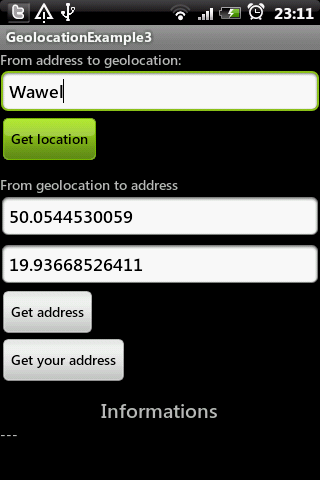
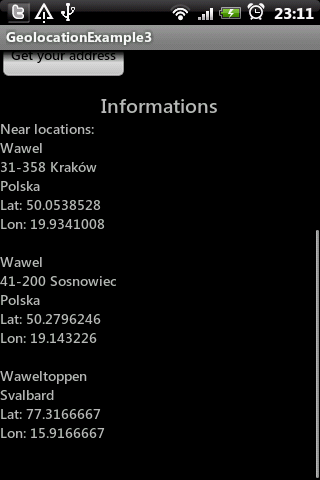

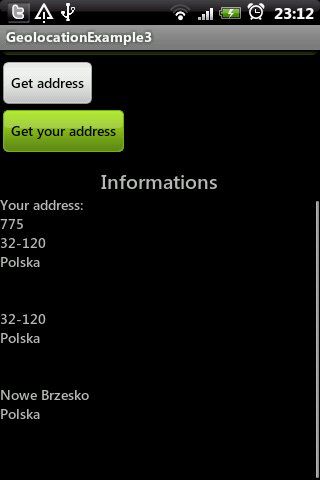
Cały projekt dostępny jest na naszym Githubie – HelloGeocoding.
MainActivity.java
Zaloguj się lub skorzystaj z profilu:
Możesz również zostawić komentarz bez rejestracji, korzystając z poniższego formularza:
Musisz być zalogowany aby móc pisać komentarze.
Geolokalizacja – translacja adres <-> współrzędne
Powiązane linki
Przygotowania
Geocoding
Reverse Geocoding
Zrzuty ekranu
Kompletny kod źródłowy
Komentarze (0)
Prześlij komentarz
- linijka 30 i 47 to obiekt Geocoder, którego konstruktor przyjmuje dwa argumenty: kontekst aplikacji oraz obiekt Locale na podstawie którego można będzie określić na jaki język mają być tłumaczone adresy.
- linijka 44 – tutaj wypełniamy pola tekstowe jakimiś przykładowymi danymi, aby nie robić tego później ręcznie.
- linijki 61, 64, 67 – te metody zaimplementujemy już za chwilę.
- szerokość geograficzna (latitude)
- dlugość geograficzna (longitude)
- ilość zwróconych adresów.
- Adres, lub nazwa konkretnego miejsca,
- Ilość zwróconych adresów.
<?xml version="1.0" encoding="utf-8"?>
<LinearLayout
	xmlns:android="http://schemas.android.com/apk/res/android"
	android:orientation="vertical"
	android:layout_width="fill_parent"
	android:layout_height="fill_parent">
	<ScrollView
		android:layout_height="fill_parent"
		android:layout_width="fill_parent">
		<LinearLayout
			android:layout_height="fill_parent"
			android:layout_width="fill_parent"
			android:orientation="vertical">
			<TextView
				android:layout_height="wrap_content"
				android:layout_width="wrap_content"
				android:text="From address to geolocation:" />
			<EditText
				android:layout_height="wrap_content"
				android:id="@+id/etAddress"
				android:hint="Type address here"
				android:layout_width="fill_parent" />
			<Button
				android:layout_width="wrap_content"
				android:id="@+id/btnAddressToGeo"
				android:text="Get location"
				android:layout_height="wrap_content" />
			<TextView
				android:layout_width="wrap_content"
				android:layout_height="wrap_content"
				android:text="From geolocation to address"
				android:layout_marginTop="10dp" />
			<EditText
				android:layout_height="wrap_content"
				android:id="@+id/etLatitude"
				android:layout_width="fill_parent"
				android:hint="Type latitude"
				android:inputType="numberDecimal" />
			<EditText
				android:layout_height="wrap_content"
				android:hint="Type longitude"
				android:id="@+id/etLongitude"
				android:layout_width="fill_parent"
				android:inputType="numberDecimal" />
			<Button
				android:layout_width="wrap_content"
				android:layout_height="wrap_content"
				android:id="@+id/btnGeoToAddress"
				android:text="Get address" />
			<Button
				android:layout_width="wrap_content"
				android:layout_height="wrap_content"
				android:id="@+id/btnFromYourPos"
				android:text="Get your address" />
			<TextView
				android:layout_width="wrap_content"
				android:layout_height="wrap_content"
				android:layout_gravity="center"
				android:text="Informations"
				android:textSize="20sp"
				android:layout_marginTop="10dp" />
			<ScrollView
				android:layout_width="fill_parent"
				android:layout_height="fill_parent">
				<TextView
					android:layout_width="wrap_content"
					android:layout_height="wrap_content"
					android:text="---"
					android:id="@+id/tvInformations" />
			</ScrollView>
		</LinearLayout>
	</ScrollView>
</LinearLayout>
<uses-permission android:name="android.permission.ACCESS_FINE_LOCATION" />
<uses-permission android:name="android.permission.INTERNET" />
public class MainActivity extends Activity {
	private EditText etAddress;
	private EditText etLatitude;
	private EditText etLongitude;
	private Button btnAddressToGeo;
	private Button btnGeoToAddress;
	private Button btnFromYourPos;
	private TextView tvInformations;

	private Geocoder geocoder;
	private LocationManager locationManager;

	@Override
	public void onCreate(Bundle savedInstanceState) {
		super.onCreate(savedInstanceState);
		setContentView(R.layout.main);
		etAddress = (EditText) findViewById(R.id.etAddress);
		etLatitude = (EditText) findViewById(R.id.etLatitude);
		etLongitude = (EditText) findViewById(R.id.etLongitude);
		btnAddressToGeo = (Button) findViewById(R.id.btnAddressToGeo);
		btnGeoToAddress = (Button) findViewById(R.id.btnGeoToAddress);
		btnFromYourPos = (Button) findViewById(R.id.btnFromYourPos);
		tvInformations = (TextView) findViewById(R.id.tvInformations);
		fillSampleData();
		initButtonsOnClick();
		locationManager = (LocationManager) getSystemService(Context.LOCATION_SERVICE);
		geocoder = new Geocoder(this, Locale.getDefault());
	}

	private void fillSampleData() {
		etLatitude.setText("50.0544530059");
		etLongitude.setText("19.93668526411");
		etAddress.setText("Wawel");
	}

	private void initButtonsOnClick() {
		OnClickListener listener = new OnClickListener() {
			public void onClick(View v) {
				switch (v.getId()) {
				case R.id.btnGeoToAddress:
					geolocationToAddress();
					break;
				case R.id.btnFromYourPos:
					currentLocationToAddress();
					break;
				case R.id.btnAddressToGeo:
					addressToGeolocation();
					break;
				default:
					break;
				}
			}
		};
		btnGeoToAddress.setOnClickListener(listener);
		btnFromYourPos.setOnClickListener(listener);
		btnAddressToGeo.setOnClickListener(listener);
	}

	private void showToast(String msg) {
		Toast.makeText(this, msg, Toast.LENGTH_SHORT).show();
	}
}
private void geolocationToAddress() {
double latitude = new Double(etLatitude.getText().toString());
double longitude = new Double(etLongitude.getText().toString());
String result = getAddressFrom(latitude, longitude);
tvInformations.setText(result);
}
private String getAddressFrom(double latitude, double longitude) {
String result = "Geolocation address:\n";
try {
List<Address> addresses = geocoder.getFromLocation(latitude, longitude, 1);
for (Address address : addresses) {
for (int i = 0, j = address.getMaxAddressLineIndex(); i <= j; i++) {
result += address.getAddressLine(i) + "\n";
}
result += "\n\n";
}
} catch (IOException e) {
showToast(e.toString());
}
return result;
} private void currentLocationToAddress() {
Location location = locationManager.getLastKnownLocation(LocationManager.GPS_PROVIDER);
String result = getAddressFrom(location);
tvInformations.setText(result);
}
private String getAddressFrom(Location location) {
String result = "Your address:\n";
try {
List<Address> addresses = geocoder.getFromLocation(
location.getLatitude(), location.getLongitude(), 3);
for (Address address : addresses) {
for (int i = 0, j = address.getMaxAddressLineIndex(); i <= j; i++) {
result += address.getAddressLine(i) + "\n";
}
result += "\n\n";
}
} catch (Exception e) {
showToast(e.toString());
}
return result;
} private void addressToGeolocation() {
String location = etAddress.getText().toString();
String result = getAddressFrom(location);
tvInformations.setText(result);
}
private String getAddressFrom(String locationStr) {
String result = "Near locations:\n";
try {
List<Address> addresses = geocoder.getFromLocationName(locationStr, 5);
for (Address address : addresses) {
for (int i = 0, j = address.getMaxAddressLineIndex(); i <= j; i++) {
result += address.getAddressLine(i) + "\n";
}
result += "Lat: " + address.getLatitude() + "\n"
+ "Lon: " + address.getLongitude()
+ "\n\n";
}
} catch (IOException e) {
showToast(e.toString());
}
return result;
}package pl.froger.hello.geocoding;
import java.io.IOException;
import java.util.List;
import java.util.Locale;
import android.app.Activity;
import android.content.Context;
import android.location.Address;
import android.location.Geocoder;
import android.location.Location;
import android.location.LocationManager;
import android.os.Bundle;
import android.util.Log;
import android.view.View;
import android.view.View.OnClickListener;
import android.widget.Button;
import android.widget.EditText;
import android.widget.TextView;
import android.widget.Toast;
public class MainActivity extends Activity {
private EditText etAddress;
private EditText etLatitude;
private EditText etLongitude;
private Button btnAddressToGeo;
private Button btnGeoToAddress;
private Button btnFromYourPos;
private TextView tvInformations;
private Geocoder geocoder;
private LocationManager locationManager;
@Override
public void onCreate(Bundle savedInstanceState) {
super.onCreate(savedInstanceState);
setContentView(R.layout.main);
etAddress = (EditText) findViewById(R.id.etAddress);
etLatitude = (EditText) findViewById(R.id.etLatitude);
etLongitude = (EditText) findViewById(R.id.etLongitude);
btnAddressToGeo = (Button) findViewById(R.id.btnAddressToGeo);
btnGeoToAddress = (Button) findViewById(R.id.btnGeoToAddress);
btnFromYourPos = (Button) findViewById(R.id.btnFromYourPos);
tvInformations = (TextView) findViewById(R.id.tvInformations);
fillSampleData();
initButtonsOnClick();
locationManager = (LocationManager) getSystemService(Context.LOCATION_SERVICE);
geocoder = new Geocoder(this, Locale.getDefault());
}
private void fillSampleData() {
etLatitude.setText("50.0544530059");
etLongitude.setText("19.93668526411");
etAddress.setText("Wawel");
}
private void initButtonsOnClick() {
OnClickListener listener = new OnClickListener() {
public void onClick(View v) {
switch (v.getId()) {
case R.id.btnGeoToAddress:
geolocationToAddress();
break;
case R.id.btnFromYourPos:
currentLocationToAddress();
break;
case R.id.btnAddressToGeo:
addressToGeolocation();
break;
default:
break;
}
}
};
btnGeoToAddress.setOnClickListener(listener);
btnFromYourPos.setOnClickListener(listener);
btnAddressToGeo.setOnClickListener(listener);
}
private void showToast(String msg) {
Toast.makeText(this, msg, Toast.LENGTH_SHORT).show();
}
	private void geolocationToAddress() {
		double latitude = new Double(etLatitude.getText().toString());
		double longitude = new Double(etLongitude.getText().toString());
		String result = getAddressFrom(latitude, longitude);
		tvInformations.setText(result);
	}

	private String getAddressFrom(double latitude, double longitude) {
		String result = "Geolocation address:\n";
		try {
			List<Address> addresses = geocoder.getFromLocation(latitude, longitude, 1);
			for (Address address : addresses) {
				for (int i = 0, j = address.getMaxAddressLineIndex(); i <= j; i++) {
					result += address.getAddressLine(i) + "\n";
				}
				result += "\n\n";
			}
		} catch (IOException e) {
			showToast(e.toString());
		}
		return result;
	}
	private void currentLocationToAddress() {
		Location location = locationManager.getLastKnownLocation(LocationManager.GPS_PROVIDER);
		String result = getAddressFrom(location);
		tvInformations.setText(result);
	}

	private String getAddressFrom(Location location) {
		String result = "Your address:\n";
		try {
			List<Address> addresses = geocoder.getFromLocation(
					location.getLatitude(),	location.getLongitude(), 3);
			for (Address address : addresses) {
				for (int i = 0, j = address.getMaxAddressLineIndex(); i <= j; i++) {
					result += address.getAddressLine(i) + "\n";
				}
				result += "\n\n";
			}
		} catch (Exception e) {
			showToast(e.toString());
		}
		return result;
	}
private void addressToGeolocation() {
String location = etAddress.getText().toString();
String result = getAddressFrom(location);
tvInformations.setText(result);
}
private String getAddressFrom(String locationStr) {
String result = "Near locations:\n";
try {
Log.d("ABCDDDDD", "a");
List<Address> addresses = geocoder.getFromLocationName(locationStr, 5);
Log.d("ABCDDDDD", "b");
for (Address address : addresses) {
for (int i = 0, j = address.getMaxAddressLineIndex(); i <= j; i++) {
result += address.getAddressLine(i) + "\n";
}
result += "Lat: " + address.getLatitude() + "\n"
+ "Lon: " + address.getLongitude()
+ "\n\n";
}
} catch (IOException e) {
Log.d("ABCDDDDD", e.toString());
showToast(e.toString());
}
return result;
}
}